Master SEO in Inertia.js: A Clear, Practical Guide
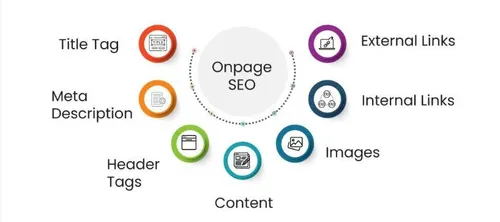
Inertia.js apps render on the client, which can make SEO tricky. This guide shows how to add proper SEO using a reusable component.
Why SEO Matters for Inertia.js Apps
Even though Inertia isn’t a full-blown SPA framework, it still renders pages dynamically and relies heavily on JavaScript. For marketing sites, blogs, landing pages, SaaS dashboards, or any content that needs ranking, proper SEO ensures:
- Your content gets indexed correctly
- Titles and descriptions reflect each page
- Social media previews display cleanly
- Google understands your structure and relevance
How Inertia.js Handles SEO
Inertia.js does not render HTML on the client side like classic SPAs. Instead:
- Your backend (Laravel, Rails, etc.) still controls routes and HTML.
- Pages load via JSON responses and dynamic component replacement.
- Metadata must be manually handled—especially titles, descriptions, and social tags.
The solution: a reusable SEO component that sets meta tags for each page.
Building the SEO Component
Create a component that handles all meta tags.
// resources/js/components/seo.tsximport { Head, usePage } from '@inertiajs/react';import { SharedData } from '@/types'; interface SEOProps { title?: string; description?: string; image?: string; imageAlt?: string; url?: string; type?: 'website' | 'article'; publishedTime?: string; modifiedTime?: string; author?: string; keywords?: string[]; noindex?: boolean; nofollow?: boolean;} export default function SEO({
title = 'Mountaga Diao Leye Diop | モンタガ', description = 'Fullstack Web Developer crafting high-performance web applications with Laravel & React JS. Passionate about clean code, scalable solutions, and bringing ideas to life through technology.', image, imageAlt, url, type = 'website', publishedTime, modifiedTime, author = 'Mountaga Diao Leye Diop', keywords = [], noindex = false, nofollow = false,}: SEOProps) { const page = usePage<SharedData>(); const appUrl = page.props.appUrl ? String(page.props.appUrl) : ''; const siteUrl = appUrl || (typeof window !== 'undefined' ? String(window.location.origin) : 'http://mdld.test'); const fullUrl = url ? String(`${siteUrl}${url}`) : String(siteUrl); const fullImage = image ? (image.startsWith('http') ? String(image) : String(`${siteUrl}${image}`)) : String(`${siteUrl}/favicon.png`); const robotsContent = String([ noindex ? 'noindex' : 'index', nofollow ? 'nofollow' : 'follow', ].join(', ')); const titleString = String(title); const descriptionString = String(description); const typeString = String(type); const authorString = String(author); const imageAltString = imageAlt ? String(imageAlt) : ''; return ( <Head> <title>{titleString}</title> <meta head-key="description" name="description" content={descriptionString} /> {keywords.length > 0 && ( <meta head-key="keywords" name="keywords" content={String(keywords.join(', '))} /> )} <meta head-key="author" name="author" content={authorString} /> <meta head-key="robots" name="robots" content={robotsContent} /> <meta head-key="og:type" property="og:type" content={typeString} /> <meta head-key="og:url" property="og:url" content={fullUrl} /> <meta head-key="og:title" property="og:title" content={titleString} /> <meta head-key="og:description" property="og:description" content={descriptionString} /> <meta head-key="og:image" property="og:image" content={fullImage} /> {imageAltString && ( <meta head-key="og:image:alt" property="og:image:alt" content={imageAltString} /> )} <meta head-key="og:site_name" property="og:site_name" content="Mountaga Diao Leye Diop | モンタガ" /> <meta head-key="og:locale" property="og:locale" content="en_US" /> {type === 'article' && publishedTime && ( <meta head-key="article:published_time" property="article:published_time" content={String(publishedTime)} /> )} {type === 'article' && modifiedTime && ( <meta head-key="article:modified_time" property="article:modified_time" content={String(modifiedTime)} /> )} {type === 'article' && author && ( <meta head-key="article:author" property="article:author" content={authorString} /> )} <meta head-key="twitter:card" name="twitter:card" content="summary_large_image" /> <meta head-key="twitter:url" name="twitter:url" content={fullUrl} /> <meta head-key="twitter:title" name="twitter:title" content={titleString} /> <meta head-key="twitter:description" name="twitter:description" content={descriptionString} /> <meta head-key="twitter:image" name="twitter:image" content={fullImage} /> {imageAltString && ( <meta head-key="twitter:image:alt" name="twitter:image:alt" content={imageAltString} /> )} <meta head-key="twitter:creator" name="twitter:creator" content="@MDLD_" /> <link head-key="canonical" rel="canonical" href={fullUrl} /> </Head> );}What This Component Does
- Accepts
propswith defaults so you only pass what changes. - Builds full URLs for
SSRand client-side. - Handles absolute and relative image paths.
- Uses
head-keyso Inertia updates tags on navigation. - Supports basic SEO, Open Graph, Twitter, and article tags.
Understanding the Code
URL Handling
const siteUrl = page.props.appUrl || window.location.origin;const fullUrl = url ? `${siteUrl}${url}` : siteUrl;In SSR, use appUrl from props. On the client, fall back to window.location.origin. Always build full URLs for social sharing.
Image Handling
const fullImage = image ? (image.startsWith('http') ? image : `${siteUrl}${image}`) : `${siteUrl}/favicon.png`;Social platforms need absolute URLs. If the image is already absolute, use it; otherwise prepend the site URL. If no image is provided, use the favicon.
The head-key Attribute
<meta head-key="description" name="description" content={description} />Inertia uses head-key to identify and update meta tags on navigation. Without it, tags may not update when navigating between pages.
Default Values
title = 'Your Default Title',description = 'Fullstack Web Developer...'Defaults values let you skip props on simple pages. Override them when needed.
Using the Component
Example 1: Home Page
import SEO from '@/components/seo'; export default function Home() { return ( <MainLayout> <SEO title="Home" description="Welcome to my website" url="/" /> {/* Your page content */} </MainLayout> );}Explanation: Only pass what differs from defaults. The component handles the rest.
Example 2: Blog Post
export default function PostShow({ post }) { return ( <MainLayout> <SEO title={post.title} description={post.excerpt} image={post.image ? `/storage/${post.image}` : ''} imageAlt={post.image_alt || post.title} url={`/posts/${post.slug}`} type="article" publishedTime={post.published_at} /> {/* Post content */} </MainLayout> );}Explanation:
type="article"tells platforms this is a blog post.publishedTimehelps with article-specific features.- Image and alt text improve social previews.
Example 3: List Page
export default function PostsIndex() { return ( <MainLayout> <SEO title="Posts" description="All blog posts" url="/posts" keywords={['blog', 'posts', 'articles']} /> {/* Posts list */} </MainLayout> );}Explanation: Keywords are optional. Use them for list/category pages if helpful.
Understanding Meta Tags
Basic SEO Tags
<title>: Page title in browser tabs and search results.<meta name="description">: Snippet in search results (keep it under 160 characters).<meta name="keywords">: Optional; use sparingly.
Open Graph Tags (Facebook, LinkedIn)
og:type:websiteorarticle.og:url: Full URL of the page.og:title: Title for social shares.og:description: Description for social shares.og:image: Image for social shares (1200x630px recommended).
Open Graph tags control how links appear when shared on Facebook, LinkedIn, and similar platforms.
Twitter Card Tags
twitter:card:summary_large_imageshows a large image.twitter:title,twitter:description,twitter:image: Content for Twitter.
Twitter uses its own tags. If Open Graph tags are present, Twitter may use them, but explicit Twitter tags give more control.
Article-Specific Tags
article:published_time: When the article was published (ISO format like 2024-01-15T10:00:00Z).
Why: Helps search engines and platforms understand the content better.
Canonical URL
<link rel="canonical" href={fullUrl} />Tells search engines which URL is the primary version, avoiding duplicate content issues.
Real Examples from my Blog
<SEO title={post.title} description={post.excerpt || post.title} image={postImage || ''} imageAlt={post.image_alt || post.title} url={postUrl} type="article" publishedTime={post.published_at} modifiedTime={post.published_at}/>type="article" tells platforms this is a blog post, enabling article-specific features and the fallback description is there if there’s no excerpt to use the title as the description.
Conclusion: That’s It!
Inertia.js is powerful, flexible, and modern—but SEO isn’t automatic. Thankfully, you don’t need heavy SSR engines or complex setups. A few simple steps are enough to make your app discoverable:
- Manage titles and metadata
- Use clean URLs
- Add structured data when relevant
- Optimize performance
- Ensure your pages can be crawled
Follow these guidelines, and your Inertia.js app will not only feel fast—it will be visible, discoverable, and ranking.
Subscribe to get new posts by email.